Guide
Building Data Products with dbt

Jochen Christ
Co-Founder & CTO, Entropy Data ·
dbt is one of the most popular tools for data transformation. Here is how we structure dbt projects as data products with clear ownership, output ports, data contracts, and quality tests. And we show how we use coding agents to implement the data products automatically.
Why dbt for Data Products?
dbt (data build tool) is a SQL-first transformation framework that runs on top of data warehouses like Snowflake, BigQuery, Databricks, AWS Athena, and DuckDB. It brings software engineering best practices to data: version control, modularity, testing, and documentation.
These properties make dbt a natural fit for implementing data products. A dbt project can represent a data product: it has clear inputs, transformation logic, output models, tests, and documentation, all in one Git repository owned by one team.
Start with a Data Contract
Let's use a real-life example of a data product we at Entropy Data use internally for customer success to help us understand how our customers use the application and if we proactively can support them building better data products with data contracts.
Before writing any dbt model, we start by defining a data contract for the target data product (or more precisely, for the data product's output port). The data contract describes what data you will need to provide, its schema, quality guarantees, and terms of use. Think of it as the requirements specification for our data product.
By designing the contract first, we align on what information is actually needed before investing time into implementation. It keeps the data product small and handy. This contract-first approach avoids building data sets that nobody uses or that does not meet our expectations.
The data contract is written using ODCS format and stored alongside the SQL it governs, under models/output_ports/v1/:
# models/output_ports/v1/entropydata-customer-activity-v1.odcs.yaml

apiVersion: v3.1.0
kind: DataContract

id: entropydata-customer-activity-v1
name: Customer Activity
version: 1.0.0
status: draft

description:
  usage: analytics
  purpose: Customer activity within Entropy Data for customer success.

schema:
- name: customer_activity
  physicalType: table
  properties:
    - name: organization_id
      description: Unique identifier of the organization.
      logicalType: string
      required: true
      primaryKey: true
      examples:
        - 550e8400-e29b-41d4-a716-446655440000
    - name: organization_vanity_url
      description: Vanity URL of the organization.
      logicalType: string
      examples:
        - acme-corp
    - name: organization_created_by
      description: Email address of the user that created the organization.
      logicalType: string
      examples:
        - admin@acme.com
    - name: organization_created_at
      description: Timestamp when the organization was created.
      logicalType: timestamp
      examples:
        - "2024-03-15T10:00:00Z"
    - name: users_total
      description: Total number of users in the organization.
      logicalType: integer
      required: true
      examples:
        - 12
    - name: users_added_30d
      description: Number of users added in the last 30 days.
      logicalType: integer
      required: true
      examples:
        - 3
    - name: users_last_signed_up_at
      description: Timestamp when the last user signed up.
      logicalType: timestamp
      examples:
        - "2024-09-10T14:22:00Z"
    - name: dataproducts_total
      description: Total number of data products in the organization.
      logicalType: integer
      required: true
      examples:
        - 42
    - name: dataproducts_added_30d
      description: Number of data products added in the last 30 days.
      logicalType: integer
      required: true
      examples:
        - 5
    - name: dataproducts_outputports_total
      description: Total number of output ports across all data products.
      logicalType: integer
      required: true
      examples:
        - 58
    - name: dataproducts_outputports_with_datacontract_percentage
      description: Percentage of output ports that have an active data contract.
      logicalType: number
      required: true
      examples:
        - 72.5
    - name: dataproducts_outputports_with_testresults_percentage
      description: Percentage of output ports that have test results.
      logicalType: number
      required: true
      examples:
        - 65.0
    - name: dataproducts_last_updated_at
      description: Timestamp when the last data product was updated.
      logicalType: timestamp
      examples:
        - "2024-09-14T09:30:00Z"
    - name: assets_total
      description: Total number of assets in the organization.
      logicalType: integer
      required: true
      examples:
        - 87
    - name: data_platform
      description: The data contract / output port type used for most data products.
      logicalType: string
      examples:
        - bigquery
        - snowflake
        - s3
    - name: updated_at
      description: Timestamp when this record was written by the dbt execution.
      logicalType: timestamp
      required: true
      examples:
        - "2024-09-16T06:05:23Z"

team:
  name: customer-success

servers:
  - server: production
    type: databricks
    catalog: entropy_data_prod
    schema: dp_entropydata_customer_activity_v1

roles:
  - role: customer_success
    access: read
A data product matching this specification would help our customer success team to identify a customer's activity and give quick information on the customer's target data platform.
In Entropy Data, the data contract can be edited and managed through the Data Contract Editor:
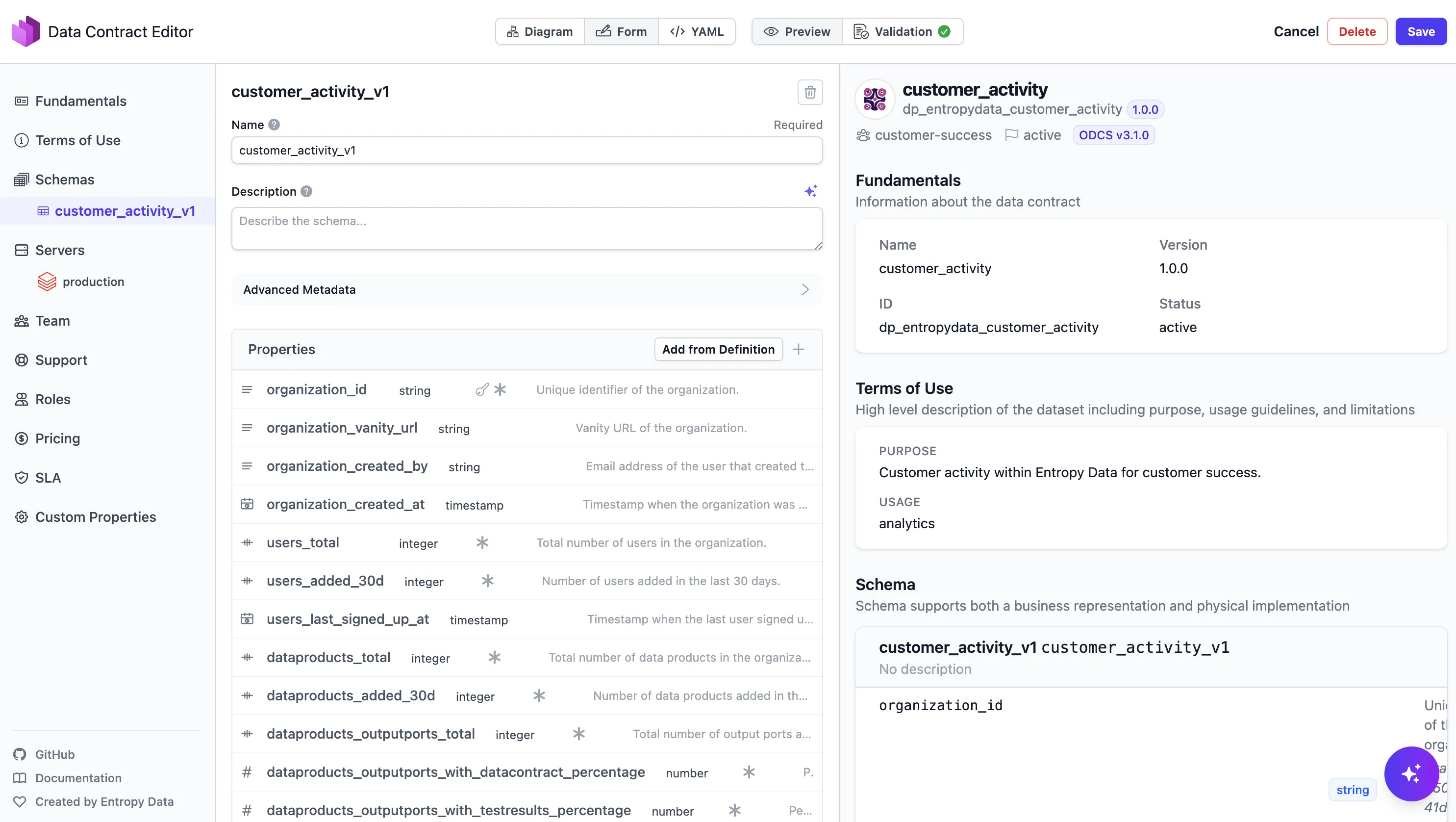
With the contract in place, the dbt implementation becomes straightforward: build the models that fulfill the contract.
Data Product Design
Our Customer Activity data product is a consumer-aligned data product: it takes raw operational data, transforms it, and serves it for a specific use case customer success.
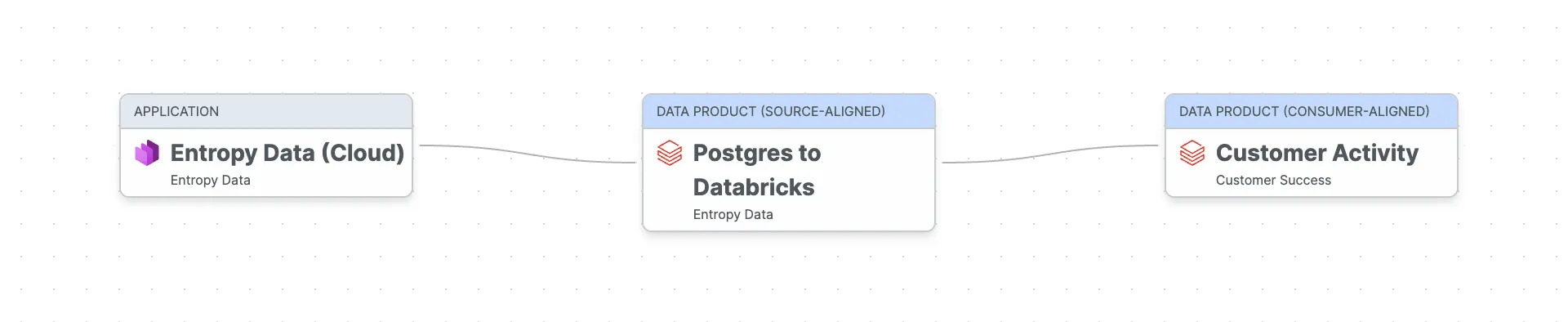
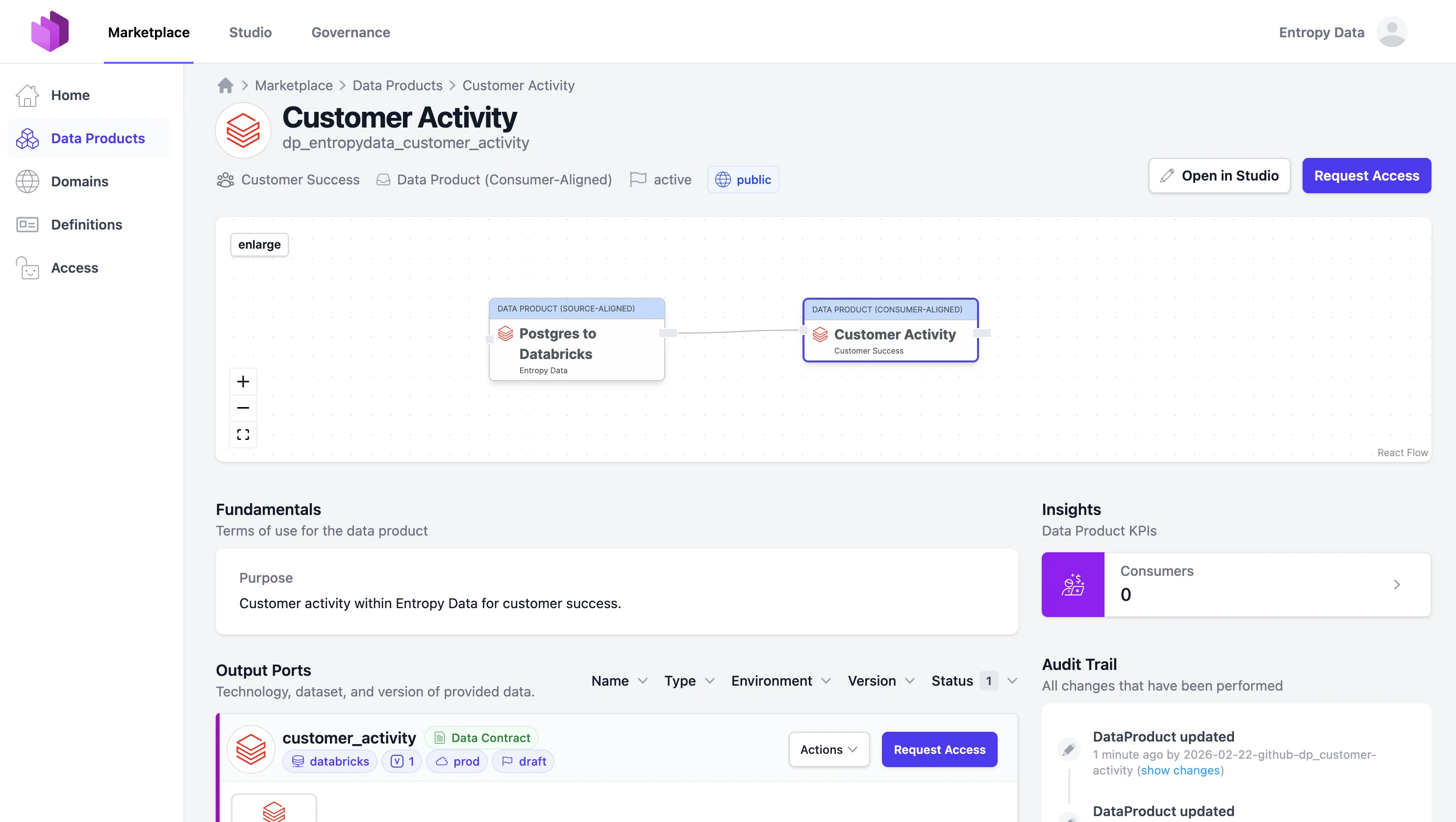
The data flows from our Entropy Data Cloud application (the operational Postgres database) through a source-aligned raw data product that extracts data from Postgres to Databricks (using dlt), into the Customer Activity data product that we want to build now with dbt.
One dbt Project per Data Product
Our recommended approach is to use one dbt project per data product. Each project is owned by one team, lives in its own Git repository so that every data product can be implemented and deployed independently. A best practice that we have learned with Self-contained Systems. This ensures clear ownership and autonomy, core principles of data mesh.
A typical dbt data product project structure looks like this:
dp_entropydata_customer_activity/
├── dbt_project.yml
├── dp_entropydata_customer_activity.odps.yaml      # Data product spec (ODPS)
├── openlineage.yml                                 # OpenLineage transport config
├── profiles.yml.example
├── .github/workflows/data-product.yml              # CI: build, test, publish
├── models/
│   ├── input_ports/                                # External sources this product reads from
│   │   ├── _models.yml
│   │   ├── <provider-output-port-id>.source.yaml   # One file per active access agreement
│   │   └── <provider-output-port-id>.odcs.yaml     # Cached snapshot of upstream contract
│   ├── staging/                                    # Internal: 1:1 cleaned views over input ports
│   │   ├── _models.yml
│   │   ├── stg_organizations.sql
│   │   ├── stg_members.sql
│   │   ├── stg_data_products.sql
│   │   └── stg_assets.sql
│   ├── intermediate/                               # Internal: joined/shaped views with business logic
│   │   ├── _models.yml
│   │   └── int_customer_activity.sql
│   └── output_ports/v1/                            # Public: versioned output port models
│       ├── _models.yml
│       ├── customer_activity.sql
│       └── entropydata-customer-activity-v1.odcs.yaml   # Data contract (ODCS), colocated with the SQL
├── tests/                                          # Custom data tests
│   └── assert_users_total_non_negative.sql
├── analyses/
├── macros/
├── seeds/
└── snapshots/
The key idea: input_ports/, staging/, and intermediate/ models are internal to the data product.
Only the output_ports/ models are the public interface that other teams consume.
Output ports are versioned (v1/, v2/, ...), and the ODCS contract sits in the same directory as the SQL model that implements it, so the contract lives next to the code it governs.
We maintain this layout as a set of coding-agent skills in the dataproduct-builder-dbt plugin, so Claude Code, Codex, or Copilot CLI can scaffold a new project, generate models from a data contract, and sync everything with Entropy Data.
Output Ports as dbt Models
Output port models are usually implemented as SQL views or materialized tables that serve as the stable API of the data product. They abstract away the internal staging and transformation logic and allow changing the implementation without affecting consumers.
Instead of writing dbt model definitions by hand, the Data Contract CLI can generate them directly from the data contract:
datacontract export dbt-models --output models/output_ports/v1/_models.yml models/output_ports/v1/entropydata-customer-activity-v1.odcs.yamlThis generates the dbt model YAML with columns, descriptions, and data types:
# models/output_ports/v1/_models.yml (generated)

version: 2

models:
  - name: customer_activity
    description: Customer activity within Entropy Data for customer success.
    config:
      meta:
        data_contract:
          id: entropydata-customer-activity-v1
          file: models/output_ports/v1/entropydata-customer-activity-v1.odcs.yaml
        owner: customer-success
      materialized: table
      contract:
        enforced: true
    columns:
      - name: organization_id
        description: Unique identifier of the organization.
        data_type: STRING
        constraints:
          - type: not_null
          - type: unique
      - name: organization_vanity_url
        description: Vanity URL of the organization.
        data_type: STRING
      - name: organization_created_by
        description: Email address of the user that created the organization.
        data_type: STRING
      - name: organization_created_at
        description: Timestamp when the organization was created.
        data_type: TIMESTAMP
      - name: users_total
        description: Total number of users in the organization.
        data_type: BIGINT
        constraints:
          - type: not_null
      - name: users_added_30d
        description: Number of users added in the last 30 days.
        data_type: BIGINT
        constraints:
          - type: not_null
      - name: users_last_signed_up_at
        description: Timestamp when the last user signed up.
        data_type: TIMESTAMP
      - name: dataproducts_total
        description: Total number of data products in the organization.
        data_type: BIGINT
        constraints:
          - type: not_null
      - name: dataproducts_added_30d
        description: Number of data products added in the last 30 days.
        data_type: BIGINT
        constraints:
          - type: not_null
      - name: dataproducts_outputports_total
        description: Total number of output ports across all data products.
        data_type: BIGINT
        constraints:
          - type: not_null
      - name: dataproducts_outputports_with_datacontract_percentage
        description: Percentage of output ports that have an active data contract.
        data_type: DOUBLE
        constraints:
          - type: not_null
      - name: dataproducts_outputports_with_testresults_percentage
        description: Percentage of output ports that have test results.
        data_type: DOUBLE
        constraints:
          - type: not_null
      - name: dataproducts_last_updated_at
        description: Timestamp when the last data product was updated.
        data_type: TIMESTAMP
      - name: assets_total
        description: Total number of assets in the organization.
        data_type: BIGINT
        constraints:
          - type: not_null
      - name: data_platform
        description: The data contract / output port type used for most data products.
        data_type: STRING
      - name: updated_at
        description: Timestamp when this record was written by the dbt execution.
        data_type: TIMESTAMP
        constraints:
- type: not_nullNow, implement the actual SQL transformation logic for each output model:
-- models/output_ports/v1/customer_activity.sql
-- Governed by entropydata-customer-activity-v1.odcs.yaml (ODCS id: entropydata-customer-activity-v1)

{{ config(
    materialized='table',
    schema='op_v1'
) }}

select
    organization_id,
    organization_vanity_url,
    organization_created_by,
    organization_created_at,
    users_total,
    users_added_30d,
    users_last_signed_up_at,
    dataproducts_total,
    dataproducts_added_30d,
    dataproducts_outputports_total,
    dataproducts_outputports_with_datacontract_percentage,
    dataproducts_outputports_with_testresults_percentage,
    dataproducts_last_updated_at,
    assets_total,
    data_platform
from {{ ref('int_customer_activity') }}
Input Ports
A data product typically consumes data from operational systems or other data products. In our data product, we use data that was extracted via dlt from our operational Postgres database to a raw / source-aligned data product on the data platform (Databricks).
In dbt, inputs are modeled as sources.
Each active data contract we consume becomes one file in models/input_ports/, named after the provider's output port id.
Alongside it we cache the upstream provider's ODCS contract as a trust snapshot, so git log shows when an upstream schema or quality rule changed under us:
# models/input_ports/op_entropydata_postgres.source.yaml

version: 2

sources:
  - name: dp_entropydata_postgres_op_entropydata_postgres
    description: Operational database of the Entropy Data platform, extracted to Databricks via dlt.
    database: entropy_data_prod
    schema: entropydata_postgres
    config:
      meta:
        data_contract:
          id: entropydata-postgres-v1
          file: models/input_ports/op_entropydata_postgres.odcs.yaml
    tables:
      - name: organization
      - name: organization_member
      - name: data_product
      - name: asset
The sources[].name combines <provider-data-product-id>_<provider-output-port-id> so two agreements with the same provider but different output ports never collide.
The cached op_entropydata_postgres.odcs.yaml sits next to the source file and is refreshed by re-running entropy-data datacontracts get, never hand-edited.
Transformation
Between input and output, the internal models handle the transformation work with the business logic. These are not exposed to consumers.
Staging models clean and normalize raw source data: deduplicate to the latest version, cast types, and rename columns.
-- models/staging/stg_organizations.sql

with source as (
    select *,
        row_number() over (partition by organization_id order by version desc) as _row_num
    from {{ source('dp_entropydata_postgres_op_entropydata_postgres', 'organization') }}
)

select
    organization_id,
    vanity_url as organization_vanity_url,
    created_by as organization_created_by,
    cast(created_at as timestamp) as organization_created_at
from source
where _row_num = 1
-- models/staging/stg_members.sql
with source as (
select *,
row_number() over (partition by organization_member_id order by version desc) as _row_num
from {{ source('dp_entropydata_postgres_op_entropydata_postgres', 'organization_member') }}
)
select
organization_member_id,
organization_id,
user_id,
role,
cast(created_at as timestamp) as created_at
from source
where _row_num = 1-- models/staging/stg_data_products.sql
with source as (
select *,
row_number() over (partition by data_product_id order by version desc) as _row_num
from {{ source('dp_entropydata_postgres_op_entropydata_postgres', 'data_product') }}
)
select
data_product_id,
organization_id,
name,
status,
specification_type,
cast(created_at as timestamp) as created_at,
cast(updated_at as timestamp) as updated_at
from source
where _row_num = 1Intermediate models apply business logic: join tables, enrich with master data, compute derived fields.
-- models/intermediate/int_customer_activity.sql

with members_per_org as (
    select
        organization_id,
        count(*) as users_total,
        count(case when created_at >= date_sub(current_date(), 30) then 1 end) as users_added_30d,
        max(created_at) as users_last_signed_up_at
    from {{ ref('stg_members') }}
    group by organization_id
),

data_products_per_org as (
    select
        organization_id,
        count(*) as dataproducts_total,
        count(case when created_at >= date_sub(current_date(), 30) then 1 end) as dataproducts_added_30d,
        -- TODO: add output_port source table to compute these metrics
        cast(0 as bigint) as dataproducts_outputports_total,
        cast(0 as double) as dataproducts_outputports_with_datacontract_percentage,
        cast(0 as double) as dataproducts_outputports_with_testresults_percentage,
        max(updated_at) as dataproducts_last_updated_at,
        first(specification_type) as data_platform
    from {{ ref('stg_data_products') }}
    group by organization_id
),

assets_per_org as (
    select
        organization_id,
        count(*) as assets_total
    from {{ ref('stg_assets') }}
    group by organization_id
)

select
    o.organization_id,
    o.organization_vanity_url,
    o.organization_created_by,
    o.organization_created_at,
    coalesce(m.users_total, 0) as users_total,
    coalesce(m.users_added_30d, 0) as users_added_30d,
    m.users_last_signed_up_at,
    coalesce(dp.dataproducts_total, 0) as dataproducts_total,
    coalesce(dp.dataproducts_added_30d, 0) as dataproducts_added_30d,
    coalesce(dp.dataproducts_outputports_total, 0) as dataproducts_outputports_total,
    coalesce(dp.dataproducts_outputports_with_datacontract_percentage, 0) as dataproducts_outputports_with_datacontract_percentage,
    coalesce(dp.dataproducts_outputports_with_testresults_percentage, 0) as dataproducts_outputports_with_testresults_percentage,
    dp.dataproducts_last_updated_at,
    coalesce(a.assets_total, 0) as assets_total,
    dp.data_platform
from {{ ref('stg_organizations') }} o
left join members_per_org m on o.organization_id = m.organization_id
left join data_products_per_org dp on o.organization_id = dp.organization_id
left join assets_per_org a on o.organization_id = a.organization_id
Building the Data Product
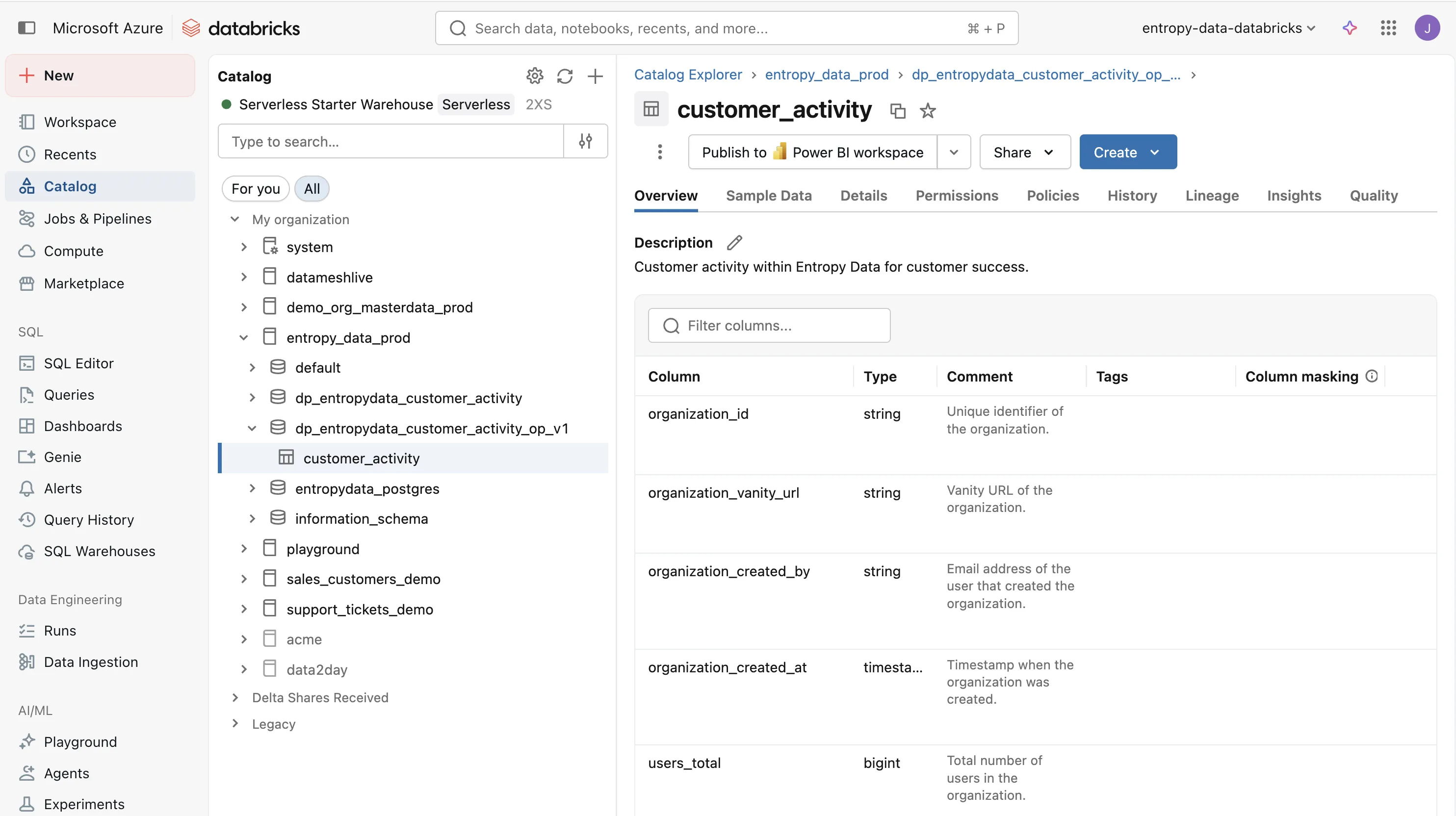
When we execute dbt run, dbt materializes all models and creates the output table on Databricks.
The result is a customer_activity table in the dp_entropydata_customer_activity_op_v1 schema, ready to be consumed by the customer success team.
Testing
Testing is what turns a dbt project into a trustworthy data product. Without tests, consumers have no reason to trust the data — they will build their own checks, duplicate logic, or simply avoid using the data product altogether. Automated tests make quality visible and give consumers confidence that the data they rely on is correct and complete.
Testing a data product works on two levels: unit tests that verify the internal implementation, and contract tests that verify the output from a consumer's perspective.
Unit Testing
dbt tests verify individual steps across the data pipeline. They are tightly coupled to the implementation and change as the dbt models evolve.
Schema tests are declared in the YAML files and validate not_null, unique, accepted_values, and relationships on each model.
Custom data tests are SQL queries in the tests/ folder that assert business rules:
-- tests/assert_users_total_non_negative.sql

select organization_id
from {{ ref('customer_activity') }}
where users_total < 0
If the query returns any rows, the test fails.
dbt contracts (since dbt 1.5) additionally enforce column names and data types at build time.
The generated dbt model already includes contract.enforced: true.
Contract Testing
The Data Contract CLI tests the output port from the consumer's point of view, against the data contract. This is an acceptance test: it connects to the actual data platform, queries the output tables, and checks schema, row counts, and quality rules defined in the contract.
datacontract test models/output_ports/v1/entropydata-customer-activity-v1.odcs.yaml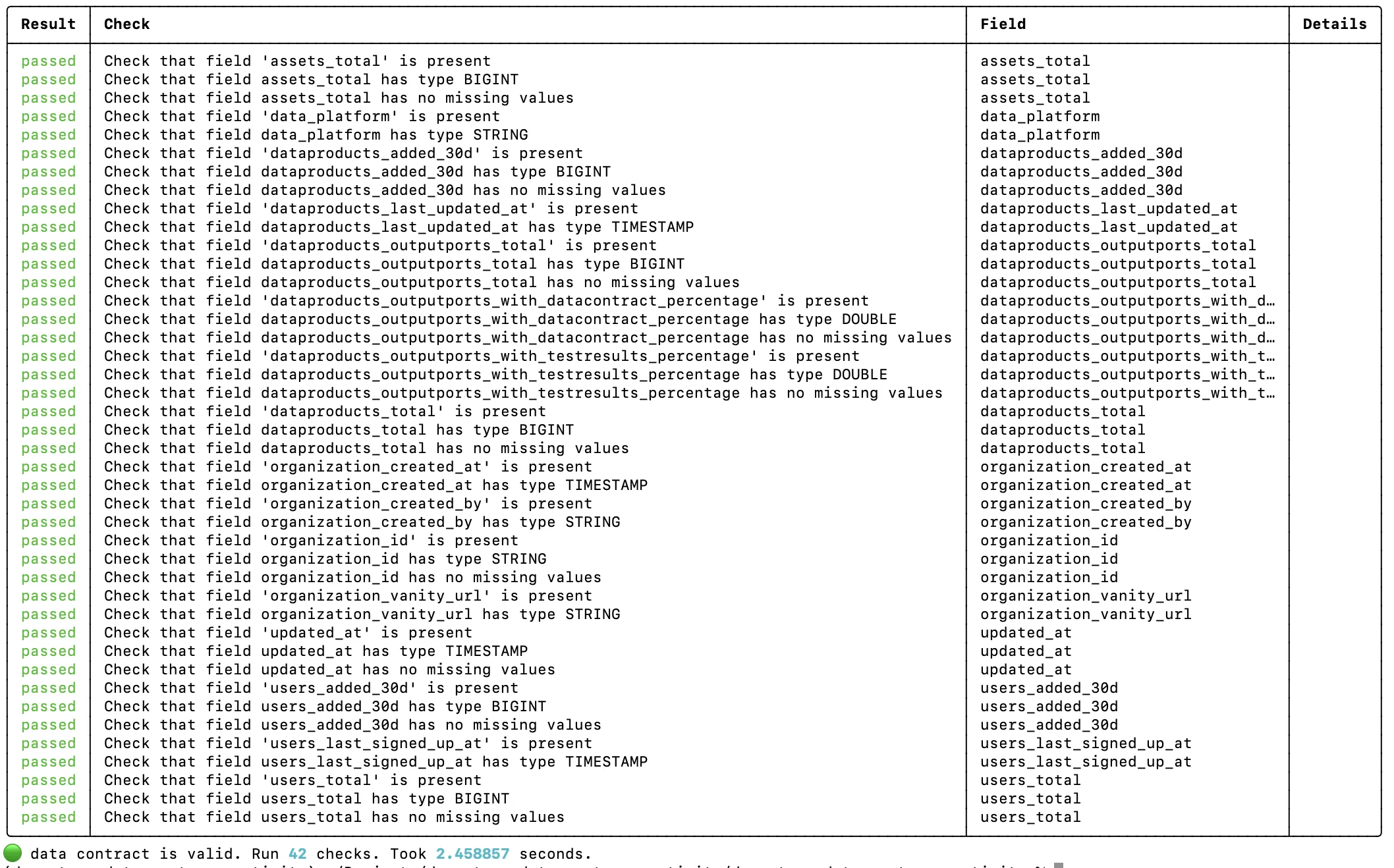
Contract tests are more stable than dbt tests. They don't change when you refactor the internal staging or intermediate models. As long as the output port still fulfills the contract, the tests pass. This makes them ideal for CI/CD pipelines and for building consumer confidence.
Lineage with OpenLineage
The OpenLineage dbt wrapper (dbt-ol) emits lineage events at the end of every dbt run.
Entropy Data ingests these events and renders an interactive lineage graph on the data product page, showing how raw input tables flow through staging, intermediate, and output models.
Configure the transport in an openlineage.yml at the project root, encoding the data product and output port identifiers as query parameters on the endpoint:
# openlineage.yml

transport:
  type: http
  url: https://api.entropy-data.com
  endpoint: api/v1/lineage?dataProductId=dp_entropydata_customer_activity&outputPortId=customer_activity
  auth:
    type: api_key
The apiKey is intentionally omitted from the file (it cannot be templated from environment variables) and is injected at runtime via OPENLINEAGE__TRANSPORT__AUTH__APIKEY, so the secret never lands in source control.
CI/CD Pipeline
Each data product has its own CI/CD pipeline that runs on every push, and periodically:
dbt-ol runmaterializes all models and emits OpenLineage events to Entropy Datadbt testruns all schema and custom data tests- Publish the data product and data contract to Entropy Data
datacontract testruns contract tests against the output port
We use a GitHub Actions workflow for this:
# .github/workflows/data-product.yml

name: Customer Activity Data Product
on:
  push:
    branches: [main]
  schedule:
    - cron: "0 6 * * *"

env:
  API: https://api.entropy-data.com/api
  DBT_DATABRICKS_HOST: ${{ secrets.DBT_DATABRICKS_HOST }}
  DBT_DATABRICKS_HTTP_PATH: ${{ secrets.DBT_DATABRICKS_HTTP_PATH }}
  DBT_DATABRICKS_TOKEN: ${{ secrets.DBT_DATABRICKS_TOKEN }}
  DATACONTRACT_DATABRICKS_TOKEN: ${{ secrets.DBT_DATABRICKS_TOKEN }}
  DATACONTRACT_DATABRICKS_SERVER_HOSTNAME: ${{ secrets.DBT_DATABRICKS_HOST }}
  DATACONTRACT_DATABRICKS_HTTP_PATH: ${{ secrets.DBT_DATABRICKS_HTTP_PATH }}

jobs:
  build:
    runs-on: ubuntu-latest
    steps:
      - uses: actions/checkout@v4

      - name: Set up Python
        uses: actions/setup-python@v5
        with:
          python-version: '3.12'

      - name: Install dependencies
        run: pip install dbt-databricks openlineage-dbt datacontract-cli[databricks] entropy-data

      - name: Create profiles.yml
        run: |
          mkdir -p ~/.dbt
          cat > ~/.dbt/profiles.yml <<EOF
          dp_entropydata_customer_activity:
            target: prod
            outputs:
              prod:
                type: databricks
                catalog: entropy_data_prod
                schema: dp_entropydata_customer_activity
                host: ${DBT_DATABRICKS_HOST}
                http_path: ${DBT_DATABRICKS_HTTP_PATH}
                token: ${DBT_DATABRICKS_TOKEN}
                threads: 4
          EOF

      - name: dbt deps
        run: dbt deps

      - name: dbt run
        run: dbt-ol run --target prod
        env:
          OPENLINEAGE__TRANSPORT__AUTH__APIKEY: ${{ secrets.ENTROPY_DATA_API_KEY }}

      - name: dbt test
        run: dbt test --target prod

      - name: Publish data product
        run: entropy-data dataproducts put dp_entropydata_customer_activity --file dp_entropydata_customer_activity.odps.yaml
        env:
          ENTROPY_DATA_API_KEY: ${{ secrets.ENTROPY_DATA_API_KEY }}

      - name: Publish data contract
        run: entropy-data datacontracts put entropydata-customer-activity-v1 --file models/output_ports/v1/entropydata-customer-activity-v1.odcs.yaml
        env:
          ENTROPY_DATA_API_KEY: ${{ secrets.ENTROPY_DATA_API_KEY }}

      - name: Data contract test
        run: |
          datacontract test models/output_ports/v1/entropydata-customer-activity-v1.odcs.yaml \
            --server production \
            --publish $API/test-results
        env:
          ENTROPY_DATA_API_KEY: ${{ secrets.ENTROPY_DATA_API_KEY }}
dbt-ol run materializes the models and ships OpenLineage events to Entropy Data, dbt test runs the unit tests.
Then, the data product and data contract metadata are published with the entropy-data CLI, which wraps the platform's REST API and reads the API key from the ENTROPY_DATA_API_KEY environment variable.
Finally, datacontract test validates the output port from the consumer perspective.
Entropy Data
Entropy Data is a data product marketplace that manages data products, data contracts, and access requests. It integrates well to provide a complete data product experience:
- Discovery: consumers browse and find data products in a self-service marketplace
- Access management: consumers request access, approvals can trigger RBAC provisioning on the data platform
- Governance: track ownership, quality, and lineage across all data products
Here is how our Customer Activity data product looks in the Entropy Data marketplace:
Use Data Product Builder to Implement using Coding Agents
The entire structure described in this article—from the dbt project layout, to the input and output port contracts, to the CI workflow, to lineage and test publishing—can be generated automatically using the Data Product Builder.
Start with a data contract. Hand it to Claude Code, OpenAI Codex, or GitHub Copilot CLI. The agent scaffolds this exact dbt project, fills in the models, sets up the tests, configures the deployment workflow, and wires up Entropy Data integration. The structure stays customizable: if you prefer Airflow over GitHub Actions, or different naming conventions, fork the template and the agent will use your fork instead.
This page explains what that scaffolding produces, how each piece fits together, and how to extend it for your organization's conventions.
Business Value
With this data product in place, our customer success team (actually these are our co-founders...) can now query the customer_activity table directly on Databricks to understand each customer's engagement:
how many users they have, whether they are actively adding data products, and what data platform they use.
This enables proactive outreach to customers who are ramping up, early detection of inactive accounts, and data-driven prioritization of support efforts.
It can support CRM activities, power AI agents that proactively identify where we can help customers build better data products or set up integrations.
The data contract guarantees the schema and quality, so they can build dashboards, agents, and automations on top of it with confidence.
Sign up now for free, or explore the clickable demo of Entropy Data.
About the author
Jochen Christ
LinkedIn of Jochen ChristCo-Founder & CTO, Entropy Data
Jochen builds tools that help data, people, and AI work together. He is the author of the Data Mesh Architecture website, maintainer of the Data Contract CLI, and a TSC member of the Linux Foundation's Bitol project, home of the Open Data Contract Standard.